SMS & WhatsApp workflow automation
Build automated message flows in a visual drag & drop builder. Auto-reply to incoming SMS, send WhatsApp templates, add delays, conditions and office hours — no code required.
- No-code drag & drop builder
- SMS & WhatsApp in one flow
- Test mode with execution trace
What is SMS workflow automation?
SMS workflow automation lets you build automated message flows that respond to events in real time. A workflow starts from a trigger — an incoming text message, a delivery report, a schedule or the birthday of a contact — and then runs the steps you designed in the visual workflow builder: send an SMS or WhatsApp message, wait for minutes or days, branch on conditions like office hours, update a contact or call your own API with an HTTP request. Everything is drag & drop — no programming knowledge needed.
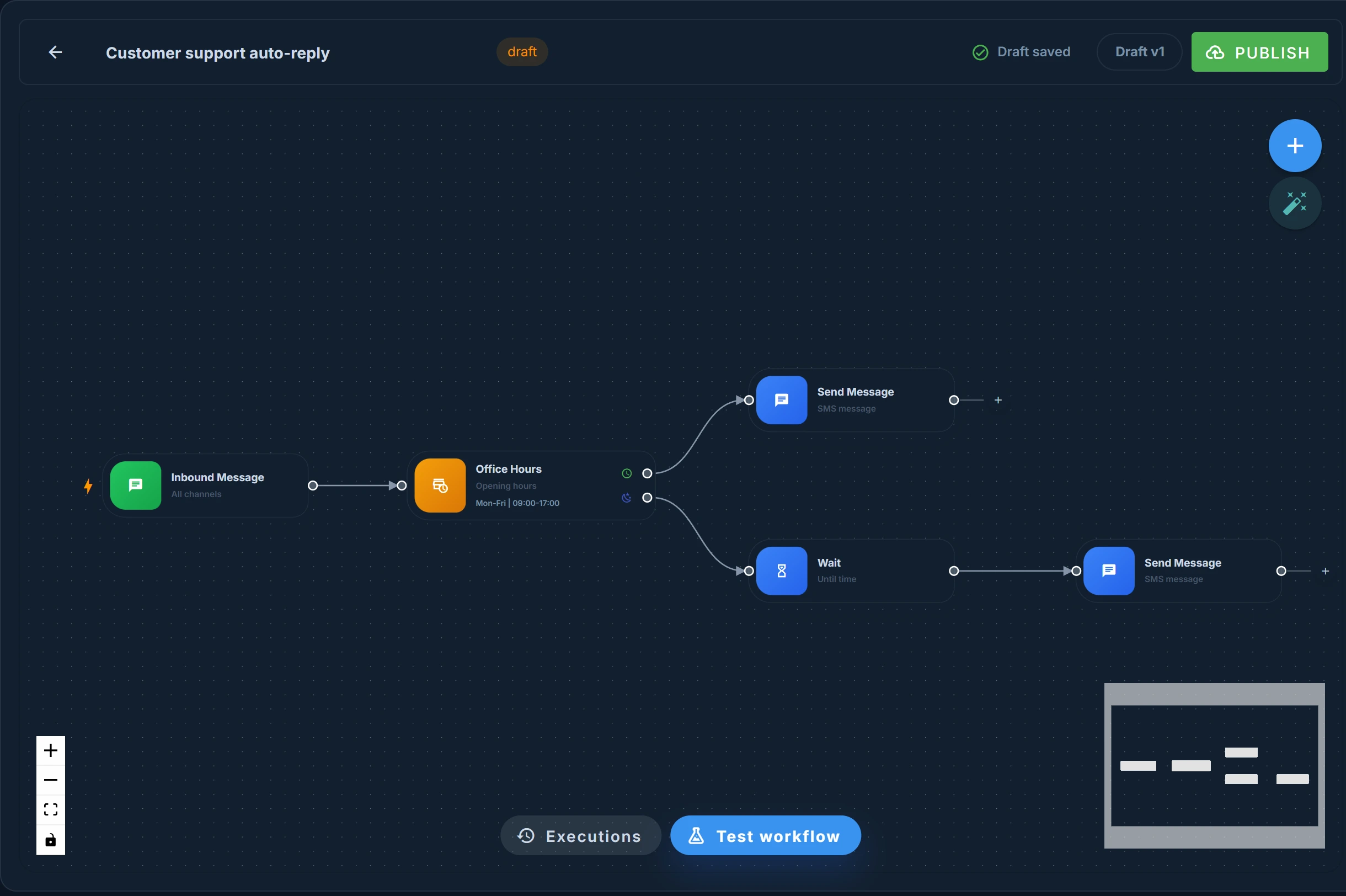
Start your workflow from any trigger
Every workflow starts with a trigger. Choose how your automation kicks off:
Inbound message
Start a workflow the moment a text message arrives on your virtual number or inbox — perfect for auto-replies and keyword campaigns.
Delivery report
React to the delivery status of sent messages: delivered, failed or undelivered. Ideal for fallback flows and alerting.
Scheduled
Run a workflow automatically on a recurring schedule — every hour, day, week or your own custom interval and timezone.
Birthday
Fire a workflow for every contact on their birthday, at the send time you choose — with a built-in duplicate check so each contact gets only one message.
Calendar appointment
Connect Google Calendar, Microsoft 365 or an iCal feed and start a workflow for every appointment: a reminder two hours before, a follow-up the day after, always from the phone number in the appointment.
Start faster with ready-made templates
Don't start from scratch: pick one of the ready-made workflow templates when you create a workflow and adjust it in the builder.
Or start with a blank canvas and build your own flow node by node.
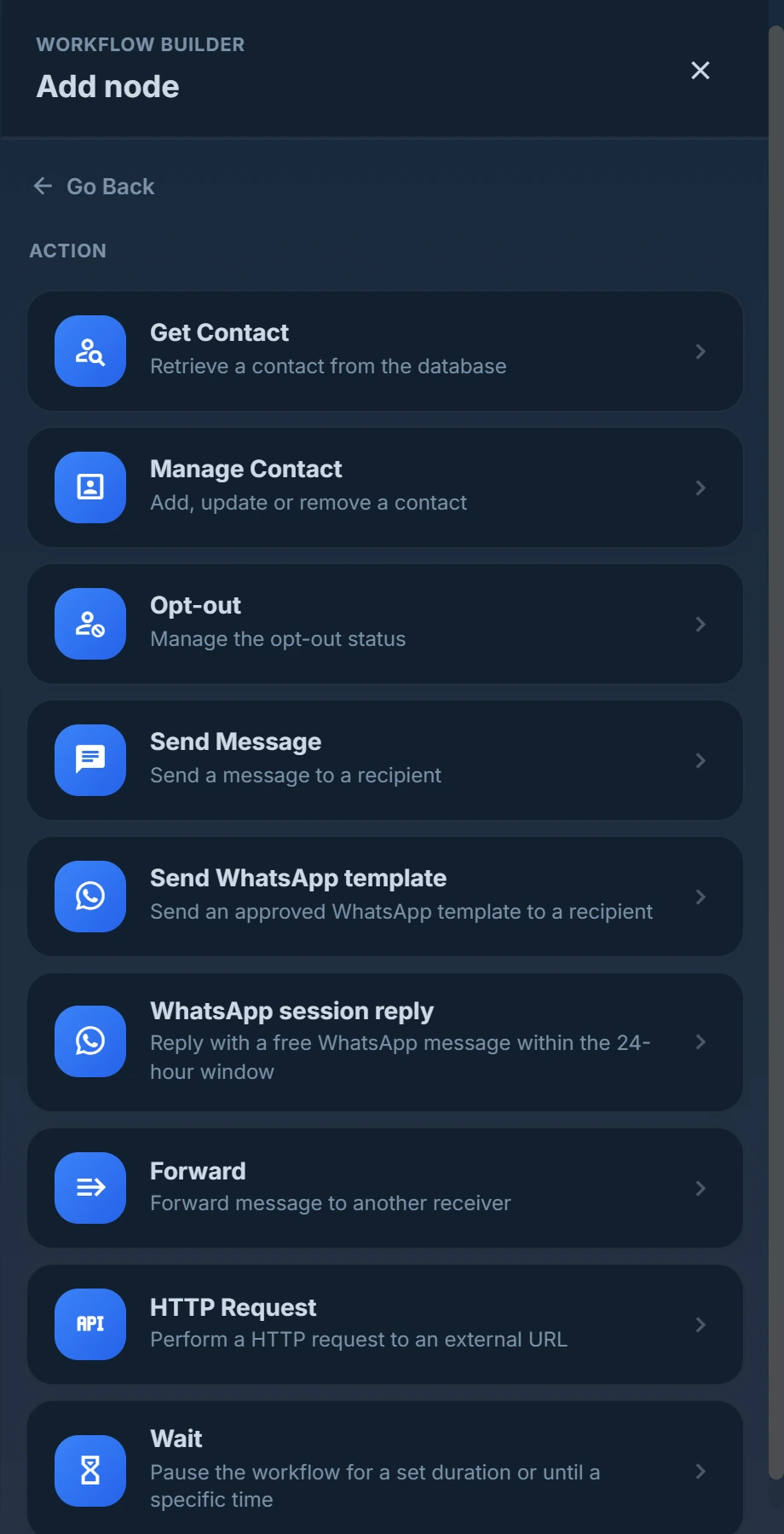
Combine actions, conditions and delays
Chain any number of steps and branches in one visual flow:
Send SMS
Send a new text message or reply automatically in the conversation the message arrived in.
Send WhatsApp template
Send approved WhatsApp Business templates with variables, header media and your own WABA sender.
WhatsApp session reply
Reply with a free-form WhatsApp message inside the 24-hour window — with an automatic fallback branch outside it.
If condition
Branch on message content, contact fields, group, country, time or date with flexible operators.
Office hours
Route messages differently during and outside business hours, with your own days, hours and timezone.
Wait
Pause a flow for minutes, hours or days, or until a specific time — perfect for drip campaigns and reminders.
HTTP request
Call any REST API or webhook with custom headers, authentication and a JSON body.
Manage contact
Add, update or remove contacts and groups automatically, including custom fields and birthdays.
Opt-out
Process opt-outs and opt-ins automatically and stay compliant without manual work.
Forward
Forward incoming messages to email, another phone number or an entire SMS group.
Personalise every message with variables like {{contact.firstname}}, {{contact.age}} and {{message.body}}.
Build your first workflow in 4 steps
Create your free account
Register for free — no credit card required. The workflow builder is available in every Smstools account.
Choose a trigger
Start from an incoming message, a delivery report, a recurring schedule or the birthday of a contact — or pick a ready-made template.
Drag & drop your steps
Add actions, conditions and delays on the visual canvas and connect the branches.
Test & publish
Test with real sample data, follow every step in the execution trace and publish your workflow live.
A workflow engine built for reliability
Design flows on an interactive canvas with autosave, auto-layout and a minimap.
Run your workflow on real sample input and see exactly which steps executed, matched or were skipped.
Keep editing safely: changes stay in draft until you publish a new live version.
Waits of minutes to days survive restarts — multi-day drip flows just keep running.
Insert contact fields, message content and sender data anywhere with variables.
Every run is logged with its status and a per-step audit trail.
SMS automation use cases
A few examples of what businesses automate with workflows:
- Auto-reply outside office hours — let customers instantly know when you will get back to them.
- Welcome & drip campaigns — send a series of messages spread over days after a sign-up.
- Automatic opt-out handling — process STOP replies immediately and keep your lists compliant.
- WhatsApp & SMS in one flow — send WhatsApp Business messages and route around the 24-hour window automatically.
- Failed delivery alerts — trigger on delivery reports and forward failures to your team or your API.
- CRM synchronisation — push incoming messages and contact updates to your own systems with HTTP requests.
Frequently asked questions
What is a workflow in Smstools?
A workflow is an automated flow of triggers, conditions and actions that you build visually. It starts from an event — an incoming message, a delivery report, a schedule or the birthday of a contact — and automatically executes the steps you defined, such as sending an SMS or WhatsApp message, waiting, branching or calling an API.
Do I need programming knowledge to build workflows?
No. The workflow builder is completely no-code: you drag triggers, actions and conditions onto a canvas and connect them. Developers can still integrate their own systems using the HTTP request action and webhooks.
Which channels can I automate with workflows?
You can send SMS and WhatsApp Business messages (templates and session replies) and forward messages to email. Workflows trigger on any inbound message, delivery report, schedule or contact birthday in your account.
Can I test a workflow before it goes live?
Yes. Test mode runs your workflow with real sample input — a contact or a recent message — and shows an execution trace of every step. Your edits stay in draft until you publish them as a new live version.
What do workflows cost?
The workflow builder is included in your Smstools account. You only pay for the messages your workflows send — pay-as-you-go, no subscription.